How to keep the same AI face in every image
Your AI avatar looks different in every picture? Build a clean reference set, lock the identity words and edit in turns: same face, any scene.
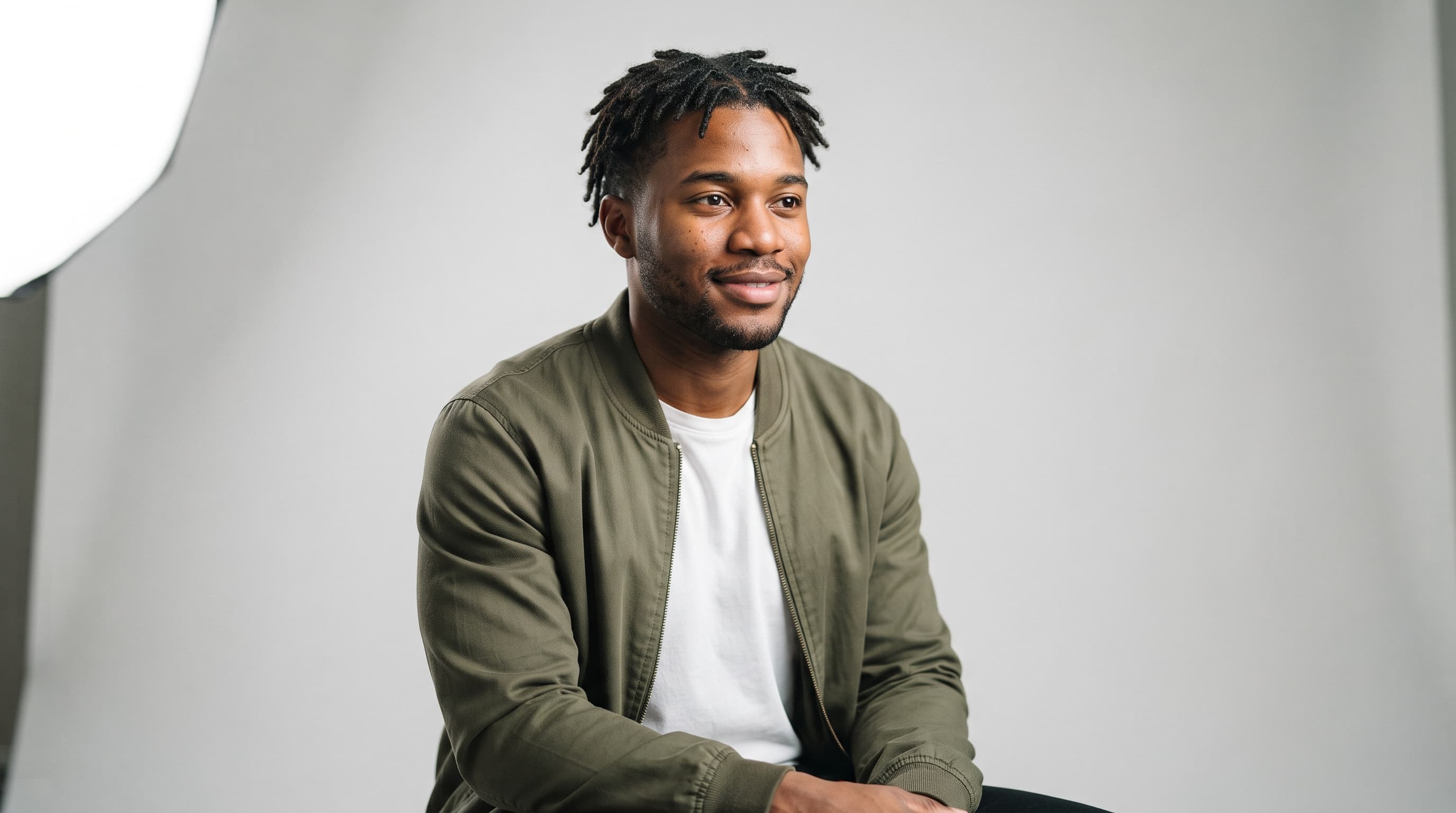
You made a face you love. Then you ask for the same person at a café and a cousin shows up: the jaw is wider, the locs are longer, the beard has moved. If your AI avatar is meant to be one recognisable person across a whole feed, that drift is the real problem. This guide gives you a repeatable method for keeping the same AI face in every image: a small reference set, a fixed block of identity words, one change at a time, and editing in turns instead of starting over. It works with any image model that accepts reference images; every picture in this post was made with Nano Banana 2 from one studio portrait.
What you need
- An image model that accepts reference images and follow-up edits, such as Nano Banana 2 or Nano Banana 2.1 (Google's docs allow up to 14 reference images in one request).
- Four clean portraits of your character: front, three-quarter, profile and a half-body shot, all in neutral light.
- A plain text note for your identity sentence and the prompts that worked.
- About ten minutes per new scene, including the drift check.
Step by step
- Build a clean reference set. Make four portraits of your character against a plain grey backdrop in soft, even light: front, three-quarter, profile and one relaxed half-body shot. Leave out hats, sunglasses, hard shadows and hands near the face, because the model copies whatever it sees.
- Give each reference one job. Pass only the images that serve the shot and say what each one is for, for example "Image 1 is his face, image 2 is his jacket." Google lists up to 4 character images for character consistency on Nano Banana 2 and 2.1, so more photos are not better.

- Lock the identity words. Write one sentence that describes the person and paste it unchanged into every prompt, for example "a Black man in his late 20s with short locs, a short beard and an olive green bomber jacket over a white t-shirt." Follow it with "keep his face, hair, skin tone and jacket exactly the same."
- Change one thing at a time. Move the location first, then the action, then the light, never all three in one prompt. Google's own editing template works well here: "change only the [element] ... keep everything else in the image exactly the same."
- Edit in turns, don't re-generate. When a result is close, reply in the same conversation ("make the light warmer", "turn his head slightly left") instead of writing a new prompt. Google calls multi-turn conversation the recommended way to iterate on images.
- Check for drift before you post. Put the new image next to your front reference at the same size and compare five things: eye shape, nose, jawline, hairline and skin tone. If one has moved, fix that feature with a single edit.
- Restart from your references when it slips. After many edits, features can start to drift. Google's advice is to open a new conversation with a detailed description; add your reference set and identity sentence again and rebuild the scene from there.
Worked example — park at golden hour. The studio portrait at the top of this page was the only reference. The prompt repeats the identity words and changes the location and nothing else, so the face, locs, beard and jacket carry over while the light turns warm.

Prompt (Nano Banana 2, 1:1):
Using the man in the reference image, keep his face, short locs, skin tone, beard and olive green bomber jacket over a white t-shirt exactly the same. Change only the location: he stands in a city park at golden hour, warm low sun behind him giving a soft rim light on his locs, relaxed half smile, three-quarter view, face clearly visible and evenly lit from the front. Trees and grass softly blurred behind him. Photorealistic, 85mm lens, square image, subject centred. No text, no logos.
Worked example — kitchen counter. Same single reference, but now the action changes as well: he is slicing vegetables. Hands and props are where drift tends to start, so the prompt still opens with the full identity sentence, word for word, before it describes the new scene.

Prompt (Nano Banana 2, 1:1):
Using the man in the reference image, keep his face, short locs, skin tone, beard and olive green bomber jacket over a white t-shirt exactly the same. Change only the location and action: he stands at the counter of a bright modern home kitchen, slicing fresh vegetables on a wooden board, glancing up at the camera with a friendly expression. Soft window daylight from the side, white tiles and green plants behind him, natural relaxed hands. Photorealistic, 35mm lens, square image, subject centred. No text, no logos, no labels.
Common mistakes
- Feeding in every photo you have. A dozen mixed references blend into a new face. Pick the two or three that match the shot and give each one a job.
- Retyping the description each time. "Short dreadlocks" in one prompt and "twists" in the next gives you two different people. Copy the identity sentence; never rewrite it.
- Changing scene, light and outfit at once. The model gives up some of the face to satisfy everything else. Make one change per prompt, then refine with edits.
- Using a dark or filtered reference. Hard shadows and colour filters become part of the identity. Shoot your references in soft, neutral light on a plain backdrop.
The bottom line
A consistent AI face comes less from finding the perfect model and more from a simple routine: a clean reference set, the same identity words every time, one change per prompt, edits in the same conversation and a quick drift check before anything goes out. If you would rather do the reference work once, ai-creator.academy lets you create an avatar with a locked identity and reuse it for new images and videos. When you are ready, start with your avatar.
FAQs
How many reference images should I use for one character?
Two to four is plenty. Google's docs list up to 4 character images for character consistency on Nano Banana 2 and 2.1, out of up to 14 reference images in total, and Nano Banana Pro takes up to 5.
Do I need to train a model to keep the same face?
Not to get started. Models such as Nano Banana 2 keep a character from reference images and follow-up edits with no training step, as long as your references are clean and your prompts stay consistent.
Why does the face change after many edits?
Each edit redraws the image, and small changes add up over a long session. Google's prompting guide suggests starting a new conversation with a detailed description when you notice features drifting.
Can I change the outfit and keep the face?
Yes, but make it its own step. Keep the face reference, then ask to change only the clothing and keep everything else the same. Changing outfit and location in the same prompt makes drift more likely.
Which angle should my main reference be?
A front or three-quarter view in neutral light, with the face filling a good part of the frame. Add the profile only when you need side shots, and use the half-body shot for scenes where the outfit matters.
Can I use the fast Lite model for this?
It is the wrong tool for consistency work. Google describes Nano Banana 2 Lite as not optimised for multiple reference inputs or multi-turn sequential editing, which are the two things this method relies on.
Sources: Gemini Nano Banana 2.1 model page · Nano Banana image generation guide · How to prompt Gemini 2.5 Flash Image Generation (Google Developers Blog) · Gemini image generation best practices (Google Cloud)